How-to guides
Set up recurring Stripe dues
Let members subscribe so dues reconcile themselves each cycle.
Recurring Stripe dues let members subscribe once and have every renewal reconcile itself: the payment lands in your ledger already matched to the member and their dues advance with no treasurer action. This recipe enables it end to end, using your space's own Stripe account.
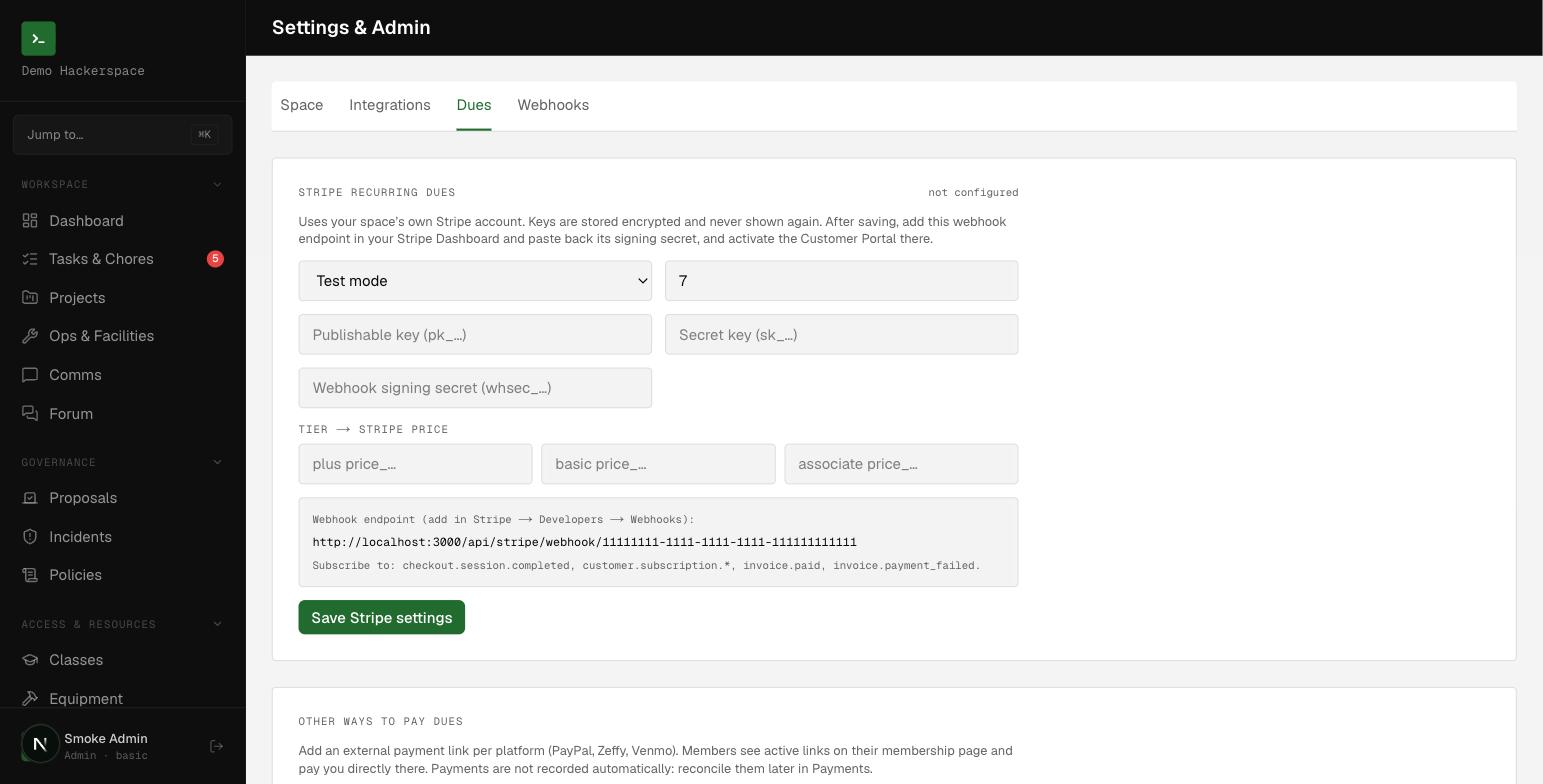 The Stripe recurring dues panel under Settings, Dues: mode, keys, grace days, and the tier-to-price map.
Before you start
You need the admin role to configure Stripe. All setup happens on the /settings screen, which is admin-only. You also need a Stripe account and, in it, the ability to create Prices, add a webhook, and activate the Customer Portal.
This is the automatic path. For PayPal, Venmo, Zeffy, or cash that you match by hand, see Connect payments and reconcile manually instead.
Create your dues Prices in Stripe
- In the Stripe Dashboard, create one recurring Price per membership tier you charge (
plus,basic,associate). - Copy each
price_...id. You will map tiers to these in the next step.
Members are charged the Price mapped to their tier, so a member whose tier has no Price cannot check out.
Enable Stripe in your space
Open /settings and go to the Dues tab, Stripe recurring dues panel.
- Set mode to
TestorLive. - Enter your publishable key (
pk_...). - Enter your secret key (
sk_...). - Fill the Tier to Stripe Price map with the
price_...ids from Stripe. - Set grace days: how long a past-due member stays
currentbefore flipping tolate(default7). - Click Save Stripe settings.
The secret key and webhook signing secret are stored in the encrypted secrets vault, never in plain config, and are never shown again. A blank secret field on a later save keeps the stored value; type a new value only to rotate it. Non-secret settings (mode, publishable key, price map, grace days) live in integrations.config.
Add the webhook
The panel shows your endpoint: /api/stripe/webhook/<your-space-id>.
- In Stripe, go to Developers, Webhooks and add that URL.
- Subscribe to these events:
checkout.session.completed,customer.subscription.*,invoice.paid,invoice.payment_failed. - Copy the signing secret (
whsec_...), paste it into the webhook signing secret field, and save again. - Activate the Customer Portal in Stripe so members can manage their card and cancel.
Without the signing secret the endpoint rejects every event, so dues will not advance until this step is done.
How a member subscribes
A member opens /me and starts checkout. The app resolves their membership and tier server-side, creates or reuses their Stripe customer, and opens a hosted Checkout in subscription mode. They never pick a plan or type an amount.
How reconciliation happens automatically
When Stripe fires an event, the webhook resolves which member it belongs to by the member_id written into the subscription and checkout metadata, falling back to the stripe_customer_id on file. It never matches by email.
- On
invoice.paid, the charge is written to your /payments ledger alreadylinkedto the member, and their last-paid date advances. No manual reconcile step. - Subscription events keep
member_billingin sync and set the membercurrentorlate.
A member stays current through the grace window, which is current_period_end plus your grace days. Only past that does the webhook mark them late. Dues never auto-set inactive; that stays an admin decision. Out-of-order events never rewind a member's paid period.